
Answers to common questions about Process Lasso. Seeing an error message, a popup at startup, or rules that don’t stay in effect? See Process Lasso Troubleshooting.
Process Lasso is mostly free. A Pro license unlocks the full set of features.
In Process Lasso, open the Help menu and choose Activate Process Lasso Pro. Enter any name, paste your activation code, then click Activate now. Your code is under My Licenses in your Bitsum account. The reminder that Process Lasso shows at startup before it is activated also has an Activate my license button.
If the Help menu shows Change License Code instead, Process Lasso is already activated. You can confirm this in Help / About Process Lasso.
See Activation Help.
No, your license comes with you. Uninstall Process Lasso from the old PC first, then install and activate it on the new one. The activation system allows a certain amount of reuse. If you ever have trouble, contact us and we will get you going again.
This is almost always caused by a registry cleaner, such as CCleaner. Make sure no such software is deleting the Process Lasso registry keys.
Yes, for lifetime licenses. The upgrade keeps your license key, so there is nothing to re-enter on your PCs, and your Single PC license counts toward the price. Choose View Upgrades next to the license under My Licenses in your Bitsum account. The receipt for a new Single PC lifetime license also has an Upgrade to Entire Home link.
We are trying lower regional prices in Brazil, Mexico and Turkey, to make Process Lasso Pro and ParkControl Pro affordable where incomes are lower. These prices are shown in Brazilian reais, Mexican pesos and Turkish lira, and they are for customers with a billing address in that country. Everywhere else the price is the same, paid in US dollars or in your own currency at the current exchange rate. The license is the same everywhere, with the same features and updates.
The Process Lasso EULA is on our Terms of Use page.
Windows 7, 8, 10 and 11, and Windows Server 2012 to 2025. There are installers for 64-bit Windows, 32-bit Windows and Windows on ARM. Memory and disk requirements are negligible.
For older versions of Windows, see OS Compatibility in the documentation.
No. Process Lasso does not leave any system changes behind when it is uninstalled.
No. We value your privacy. Process Lasso doesn’t send any user or process data to Bitsum. It connects to our servers only to check for updates and to validate licenses.
Yes. “Project Lasso” is a common misreading of “Process Lasso”. There is no product called Project Lasso.
Yes: See all Process Lasso features. Free vs Pro shows what each edition includes, and the documentation covers every feature in detail.
You don’t need to understand or use all of Process Lasso’s advanced features. You can simply install it and forget it: ProBalance and Performance Mode work out of the box.
We also offer ParkControl. It includes the Bitsum Highest Performance power plan, some power plan automation such as Dynamic Boost (similar to IdleSaver), and other features.
You don’t need it, but you can have both installed. ParkControl adds:
Yes. You can close the Process Lasso window as long as the core engine (ProcessGovernor.exe) keeps running; it applies your rules in the background. Process Lasso asks about this when you exit. If you don’t see the question below when you exit, reset your saved “do not show again” answers with View / Reset / Reset ‘Do Not Show Again’ Memory.

Yes, and more than ever as CPU core counts grow. You can run your processes on the cores you want, and make other adjustments.
On every PC, ProBalance helps manage troublesome background processes that would otherwise disrupt games or apps. Even on a PC whose processes behave well, it is important to keep ProBalance active as a safety net.
The automation, process rules, persistent settings such as CPU affinities, and algorithms like the Instance Balancer, CPU Limiter and IdleSaver are there when you need them.
Performance Mode (the Bitsum Highest Performance power plan) boosts performance by turning off the CPU’s power saving functions, and it can engage automatically when you run games or performance-critical apps.
No product fixes every system problem, and not every use benefits equally from Process Lasso’s automatic tuning. ProBalance does always protect you from the worst case, which you may run into at some point, and it can save you from having to force a shutdown.
ProBalance acts only when it is needed. If you are barely loading your PC, you won’t see much difference in responsiveness. When the CPU is heavily loaded, you will see a dramatic improvement if the problem is CPU bound. Sometimes the cause is I/O, such as waiting for a hard drive; when it is the CPU, ProBalance addresses it.
The CPUEater demo shows the effect, and you can try it yourself. There is no trick: You can recreate the demo in any language with a simple infinite loop. See how ProBalance works for more.
The automation features are utilities that do what you set them up to do, so none of this applies to them.
The defaults are usually best, with ProBalance active. For games and other performance-critical apps, right-click their processes and choose Induce Performance Mode, or turn on automatic game detection with Options / Power / Performance Mode / Enable Automatic Detection (e.g. Steam).
We can’t say whether a specific CPU affinity, priority or other rule will reach your goal, since the best rules vary so much between PCs and applications. We build Process Lasso to give you full control over your processes, and when a general optimization is possible, we build it into an algorithm like ProBalance and turn it on from the start.
Keep your rules precise and few. Micro-managing the CPU affinity of every process probably isn’t a good strategy. Constraining one problematic background process, or keeping a game on a specific set of cores, is more likely to help. Most of the time it is best to let Windows schedule threads on whatever cores it sees fit.
We don’t have the resources to tune individual PCs; our job is to build the tools that make tuning possible. Tuning guides come from the community, and our setup guide covers the general approach.
We recommend a conservative, selective approach: Adjust the priorities of only the processes you are concerned about, not all of them.
Possibly, but it usually works better the other way around: Lower the priorities of whatever might interfere with your critical applications. That is much more effective than raising the priority class of the applications themselves.
Yes. Process Lasso is popular with audiophiles and others who need the best real-time performance. Performance Mode puts your hardware in the best power state for real-time work, and ProBalance keeps background processes from interfering. ProBalance is active by default. To have Performance Mode engage whenever your real-time applications run, right-click their processes and choose Induce Performance Mode.
With Process Lasso, audio drop-outs, clicks, pops and other distortions are minimized. It can’t solve every real-time processing issue, but it will do its best to help.
For the best settings, leave ProBalance enabled so it can act on background processes that interfere with your real-time apps. You probably won’t need to exclude anything from it: By default it ignores processes with a non-normal priority, and most audio apps raise their own priority. Use Performance Mode, or another performance-focused power plan such as Bitsum Highest Performance. The best priority classes and CPU affinities vary, so you’ll have to experiment.
No. ProBalance doesn’t actually restrain anything; we use that word for lack of a better one. By default it temporarily lowers the offending process’s priority class to Below Normal, a small change to its precedence while processes compete for the CPU. In real-world and synthetic tests, such as the CPUEater demo, that is all it takes to restore the rest of the PC’s responsiveness, and it doesn’t affect the performance of the process it acted on.
ProBalance is designed never to degrade performance, only to improve it, and it is very conservative. For example, by default it acts only on processes of Normal priority class. Most audio apps set themselves to High priority, and an application that sets its own priority class is assumed to know best. If ProBalance ever does act on a process that matters to you, you can exclude it, but that is very rare thanks to the built-in exclusions.
See how ProBalance works for more.
The default settings are the most tested and work best for most people. ProBalance has to be a little aggressive so it can act before a process causes a responsiveness problem. That isn’t an issue, because the small change it makes to priority classes has no negative impact; it won’t slow a process down, for instance. A priority class only matters when there is a lot of contention for the CPU, so ProBalance acts as a safety net in case Windows, or another application, needs a few CPU cycles to stay responsive.
If you want to tune it further, you will need to experiment to see whether other settings work better for you.
Security software is generally excluded from any automatic action by ProBalance.
ProBalance is also very conservative, with a number of conditions that must be met before it acts. When it does act, it does just enough to fix the responsiveness problem, by temporarily lowering the offending process’s priority class to Below Normal. You can see which processes it acted on in the log and in View / Open ProBalance Insights….
In the unlikely event of a problem, any process can be excluded from ProBalance.
ProBalance has temporarily lowered the game’s priority class. That normally doesn’t affect performance, and the restraint is lifted while you’re playing, but we suggest right-clicking the game’s process and choosing Exclude from ProBalance.
Process Lasso is lightweight, and features you don’t use take no resources. Most features stay off until you turn them on.
You can also close the Process Lasso window and tray icon. The core engine (ProcessGovernor.exe) keeps enforcing your rules.
Performance Mode (formerly Gaming Mode) switches Windows to the Bitsum Highest Performance power plan while your games or chosen programs run. See how Performance Mode works.
By default, Performance Mode simply engages the Bitsum Highest Performance power plan, so the two do the same thing. Performance Mode is a separate setting so you can have it use a different power plan (Options / Power / Performance Mode / Select Power Profile…), and so Process Lasso can take more actions in Performance Mode later.
Bitsum Highest Performance engages automatically for detected games only if automatic game detection is on. It is off by default in current versions, but older installs may have it on. To make sure it is off, uncheck Options / Power / Performance Mode / Enable Automatic Detection (e.g. Steam).
Otherwise it engages only for processes you’ve set to Induce Performance Mode. You can edit that list with Options / Power / Performance Mode / Performance Mode Processes…. You can also have Performance Mode use another power plan, with Options / Power / Performance Mode / Select Power Profile…, and keep Bitsum Highest Performance installed.
To remove the power plan permanently, use Options / Power / Bitsum Highest Performance / Uninstall. That keeps Process Lasso from recreating it. If you already deleted the plan yourself, use Reinitialize in the same menu to recreate it first, then Uninstall.
Bitsum Highest Performance isn’t installed by default on PCs that appear to mainly use power modes instead of traditional power plans. On those PCs you can use the “Balanced: Max Performance Overlay” power mode instead, and tune it with ParkControl if you like.
To install Bitsum Highest Performance anyway, use Options / Power / Bitsum Highest Performance / Install or Reinitialize.
The Bitsum Highest Performance power plan, which Performance Mode engages, keeps the CPU from downclocking below its base speed, so it is always ready to run code at full performance.
If that isn’t what you want, you can adjust the power plan’s settings with ParkControl, or remove it with Options / Power / Bitsum Highest Performance / Uninstall.
Each power plan has its own display brightness, so switching power plans can change it.
To fix it, set the brightness of Bitsum Highest Performance, and of any other power plans you use, to match. In Windows, open Power and sleep settings, click Additional power settings, then change each plan’s settings (you may have to click Show additional plans).
When two or more running processes have rules for different power plans, the most recently started one generally wins, but that isn’t guaranteed. Avoid conflicting power rules.
SteamVR changes the active power plan when it starts, then wrongly restores Bitsum Highest Performance when it closes.
To work around this, set Options / Power / Start Process Lasso with Power Profile, for example to Balanced. Process Lasso returns to that power plan whenever no power rules are active.
Generally not. You can choose not to use Process Lasso’s power plan automation and keep the benefit of its other features. The only power plan automation that may be on without your setting it up is automatic game detection, which is off by default in current versions but may be on in older installs. To make sure it is off, uncheck Options / Power / Performance Mode / Enable Automatic Detection (e.g. Steam).
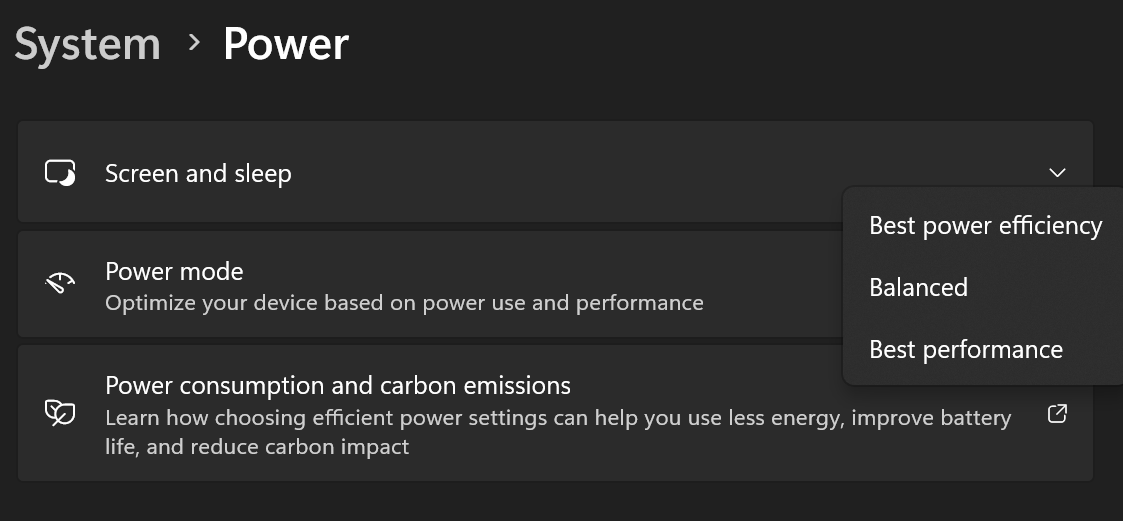
Switch to the Balanced power plan, then open the Windows power settings and choose one of the three power modes, as shown below. You can also choose a power mode from the battery icon in the system tray. Then restart Process Lasso so the power modes show up in it.
See Why do I only have a Balanced power plan? for more.
CPU core parking is controlled by the settings of the active power plan. Process Lasso doesn’t control it directly; it can only turn core parking off by engaging the Bitsum Highest Performance power plan (Performance Mode).
That isn’t possible on PCs with locked-down power plans that offer only Balanced. On those, use the battery icon in the system tray to adjust performance.
If your PC does have the usual power plans, use Performance Mode to turn off core parking while important applications run: Right-click the application’s process and choose Induce Performance Mode.
Keep Awake calls a Windows power management function to tell the system that activity is still going on. It doesn’t simulate keyboard input or use any other hack; none is needed. It makes this call at least once a minute, more often if required.
Windows doesn’t treat game controller input like keyboard or mouse input: It doesn’t reset the idle timer.
For now, the solution is to use Performance Mode with your games. IdleSaver stays off while Performance Mode is engaged, as long as Options / Power / Performance Mode / Disable IdleSaver while Performance Mode Engaged is checked (the default). Right-click your game’s processes and choose Induce Performance Mode.
If you’d rather Performance Mode didn’t change the power plan, uncheck Options / Power / Performance Mode / Change Power Profile when Engaged.
The number of cores an application uses depends on how multi-threaded it is. Process Lasso, or any other outside tool, can’t change that: A single thread can’t be split into several from outside the application. More parallelism takes changes to the application’s code, and even then it isn’t always possible, since many tasks are linear by nature.
The same goes for the GPU: An application has to be written to use it. This is why the performance of each CPU core still matters. A single-threaded, CPU-bound load uses one core even on a PC with 256 of them, and that core’s speed is the limit.
Process Lasso can still help. ProBalance keeps the PC responsive during heavy loads and keeps background processes from interfering with games. The Instance Balancer spreads the load of several instances of an application across cores. On PCs with more than 64 logical processors (more than one processor group), the Processor Group Extender helps applications that aren’t processor group aware use all of them.
No. That pattern means a single thread is doing the work, and its load can’t be spread across cores. The thread could be moved rapidly between cores so the load looks spread out, but each switch has a cost, so it would run slower with the same total CPU use.
Seeing one core spike is normal. It is why single-threaded performance is such an important CPU metric.
Sometimes, depending on your reason, but do it carefully.
If your goal is more performance, remember that the Windows scheduler already decides which threads run on which cores. Micro-managing CPU affinities second-guesses it, which is only appropriate when you know what the loads will be and what you’re doing.
If your goal is to limit a process’s CPU use, you can give it only some of the cores. Make sure it isn’t blocking, meaning that slowing it down doesn’t also slow something else, or everything else. You also have to accept the matching drop in that application’s performance.
We don’t recommend limiting the CPU affinity of all processes with one broad rule, or of system and security software, whose components may hold up other applications until their work is done. System processes should generally be free to run on any core, and haphazard tweaks to them can have side effects that aren’t obvious right away. In practice it rarely matters unless your rules are very constraining. If you’ve found a set of rules that works for you, keep using it.
Create a CPU affinity rule in Options / CPU / CPU Affinities…. Match only the applications you mean to restrict. You can match many processes with a wildcard or a regular expression, but system processes should generally have free choice of CPUs.
To send every process that has no rule of its own to specific cores, add a broad rule, even just *, and move it to the end of your CPU Affinities or CPU Sets list. In practice, something a little narrower, such as *\program*, matches most applications while leaving out most system components.
Use ordered CPU affinity rules, created with Options / CPU / CPU Affinities….
For example, the rules below keep every process except someapp.exe off CPU 1, giving someapp.exe that core to itself. In practice you probably wouldn’t limit a process to a single core, but it shows the technique. You may also want something narrower than the match-all wildcard (*), such as *program files*, to leave system processes unconstrained.
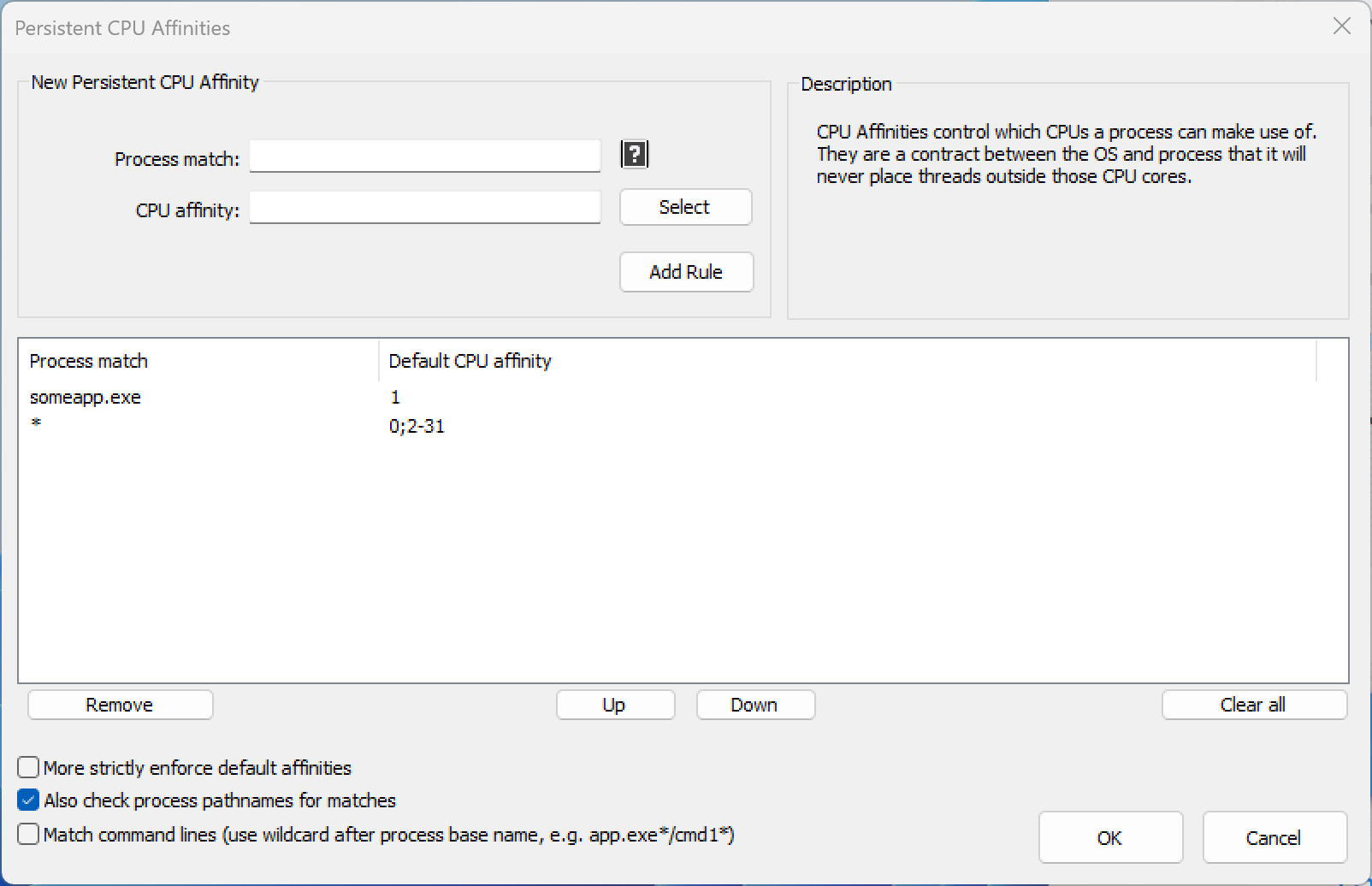
Usually you only need a CPU affinity rule that puts your game on the cores you want. Windows should keep other processes off those cores while the game uses them. You can also create CPU affinity rules that keep other processes off your game’s cores. Select several processes in the process list to create a rule for all of them at once, or use Options / CPU / CPU Affinities… for more complex rules, such as one that matches every process in a folder.
The Instance Balancer does exactly that: It gives same-named instances their own CPU affinities and manages them as instances come and go.
Set it up in Options / CPU / Instance Balancer…. The Process Lasso 9.1 announcement has more about it.
For other kinds of rules, find something that sets those instances apart and match on it:
firstinstance, and match it with *firstinstance*.something.exe, that is /^([^,]*,){5}something.exe.*,/See process matching in the documentation for more.
Process Lasso can disable SMT or Hyper-Threading for individual processes. It does this with a staggered CPU affinity, so the process can use only one logical processor on each physical core.
SMT shares the execution units of one physical core between two logical processors, so some workloads may run better with their threads on separate physical cores, where they don’t compete for those units. Windows already tries to schedule threads on separate physical cores, though, so disabling SMT may not be necessary.
We have no data on which apps, games or hardware benefit from disabling SMT.
No, Process Lasso can’t show which core a thread is running on right now. When threads use a lot of CPU, you can sometimes tell from the per-core CPU use. You can be sure the threads run only within the CPU affinity assigned to the process.
This is probably the processor group limit. Windows divides more than 64 logical processors into processor groups, and many applications schedule on only one group. Read more in The 64 Core Threshold: Processor Groups on Windows.
For an application that schedules on only one processor group, the Processor Group Extender will help. Give it a try, and let us know how it goes.
On the AMD Threadripper 3990X, use the Processor Group Extender only where an application needs more cores but isn’t processor group aware. Process Lasso’s general features, such as ProBalance, Performance Mode and process rules, apply as usual. CorePrio does not apply to the 3990X; it is specific to the 2990WX.
On these PCs, Windows divides the logical processors into groups of up to 64, so a rule that spans more than one group needs more than one set. That is what the list on the left of the CPU Sets dialog is for.
Click the + button under the CPU Sets list, choose another processor group from the dropdown at the upper right, and select CPUs from that group to add a second set. That is why the feature is called CPU Sets: A rule can hold more than one set.
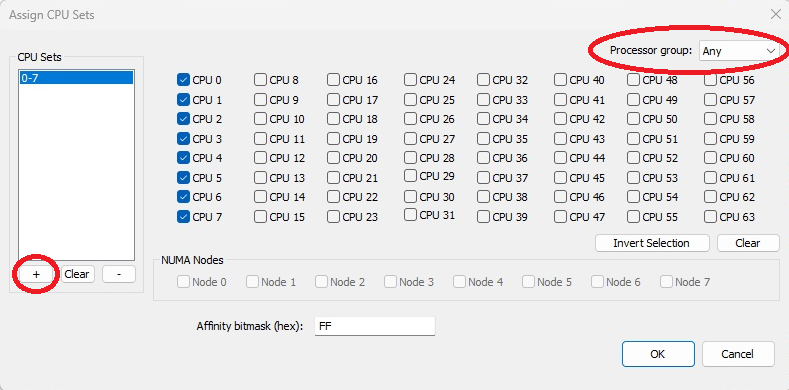
Process Lasso’s CPU Sets and CPU affinity rules let you choose which processors specific apps use on the 7950X3D. We recommend CPU Sets, since they let an app grow beyond its preferred cores when it needs to. For which X3D models need this and a step-by-step setup, see AMD Ryzen X3D CPUs: Keeping Games on the 3D V-Cache CCD.
Use Options / Tools / System Reserved CPU Sets. See System Reserved CPU Sets in the documentation.
This kernel setting is stored in the registry value below, so you can also remove it by deleting the value and restarting. This .reg file removes the System Reserved CPU Sets value.
HKEY_LOCAL_MACHINE\System\CurrentControlSet\Control\Session Manager\kernel\ReservedCpuSetsNo. Process Lasso adapts to the change. If you have CPU affinity or CPU Sets rules, you may need to redo them to target the cores you want on the new CPU.
You will probably need to reactivate Process Lasso. In that case, simply enter your activation code again.
Some processes change their own CPU affinity or priority, or another application changes them. By default, Process Lasso applies a rule once, when the process starts or when the rules change, and then defers to whatever else acts on the process.
Turn on Options / Forced Mode to have Process Lasso keep reapplying your rules. Forced Mode adds no significant overhead; leaving it off is more a matter of being nice to processes that adjust their own settings. It may become the default in the future. See Forced Mode in the documentation.
For most rule types (priority, CPU affinity and so on), the rule list in the Options menu’s dialogs can be put in order. That order sets the precedence of rules of the same type. Once a process matches a rule, further rules of that type aren’t checked for that process until the rule configuration changes.
When an algorithm and a rule conflict, such as the CPU Limiter and a CPU affinity rule, the algorithm takes precedence.
Yes, with the Config Profile Switcher, under File / Config Profile.
Create one config profile for gaming and another for the rest of the time. If you want each profile to undo the other’s changes, give it rules that do so, since process changes aren’t undone when the profile switches. Then have the Config Profile Switcher switch to your gaming profile while your games run; you can name them, or give paths with wildcards.
The Process Lasso 10.3 announcement has more about it.
Set a Watchdog rule that writes a log entry when any process goes over a CPU use threshold. Open the Watchdog with Options / Control / Process Watchdog (advanced rules)… and create a rule like the one below. When a rule matches all processes, you may see a warning as you add it; you can ignore that.
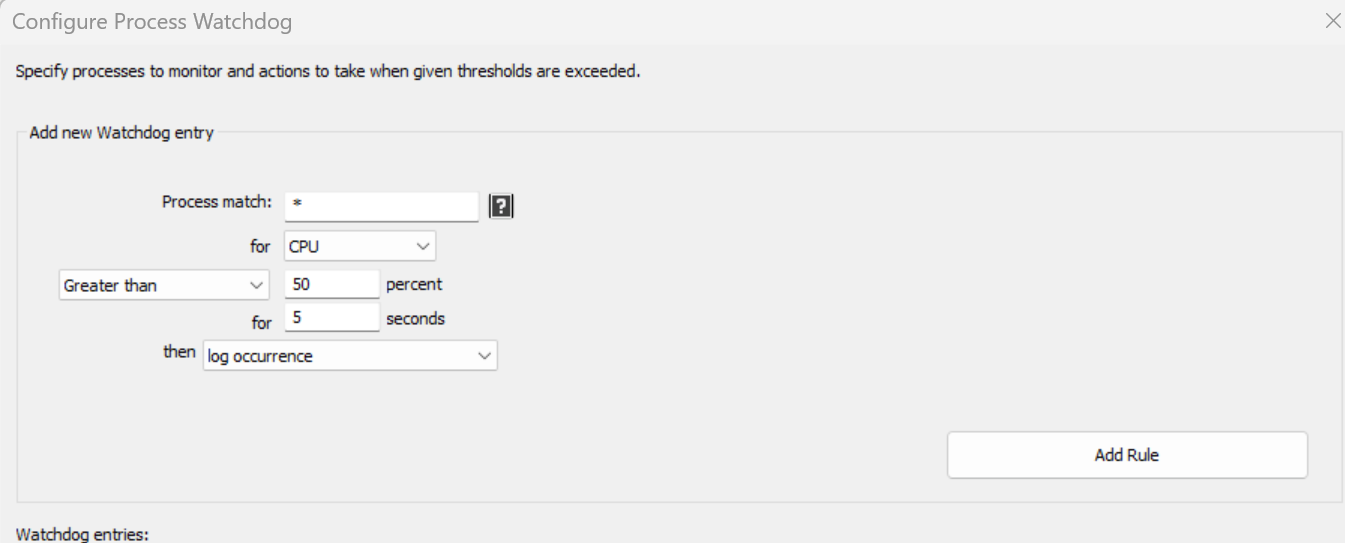
You can also use sampling, in Options / Log / Configure Sampling…, but the CSV it writes needs further processing to find the interesting data.
Uncheck Options / General / Ignore Problematic Processes. That fixes it without any ill effect.
Older versions had this setting on by default and newer ones don’t, so some older installs may still have it checked.
Yes. Process Lasso has hard throttling, in Options / CPU / More / Hard Throttles…, but we don’t recommend using it. The CPU Limiter or a constrained CPU affinity is a better solution whenever possible.
Hard throttling periodically suspends a process’s threads to force its CPU use down.
Dynamic Thread Priority Boost gives a thread a brief extra priority boost when it wakes from a wait. For example, when an app becomes active, it gets a tiny, short-lived priority boost. This is in addition to the longer foreground boosts Windows already gives, which Process Lasso’s Foreground Boost can extend.
Dynamic Thread Priority Boost is on for all processes by default, and it should usually stay that way.
Not directly. Refusing an application’s memory requests would simply make it crash, so limiting memory means using Watchdog rules to restart or terminate a process when it goes over a threshold. Sometimes, slowing a process down with a constrained CPU affinity (for example with the CPU Limiter) also slows how fast it uses up memory.
You can also trim a process’s memory, but if the process is actively using that memory, it is paged right back in. This usually isn’t a good idea, since Windows pages out seldom-used memory on its own anyway.
For an application with a memory leak, the only way to deal with it is a Watchdog rule that restarts or terminates the process when its memory use grows past a threshold.
Only by shutting down applications in that session when they go over a memory threshold.
You can do this with Watchdog rules, but they apply to each process, not to the session as a whole. For example, you could create a rule that terminates any process in user bob’s session when it goes over a virtual memory limit. The process match might look like this:
winword.exe:bobYou can use wildcards, or even regular expressions:
win*.exe:bo*Make your process matches as specific as you can. The resulting Watchdog rule might look like the one below.
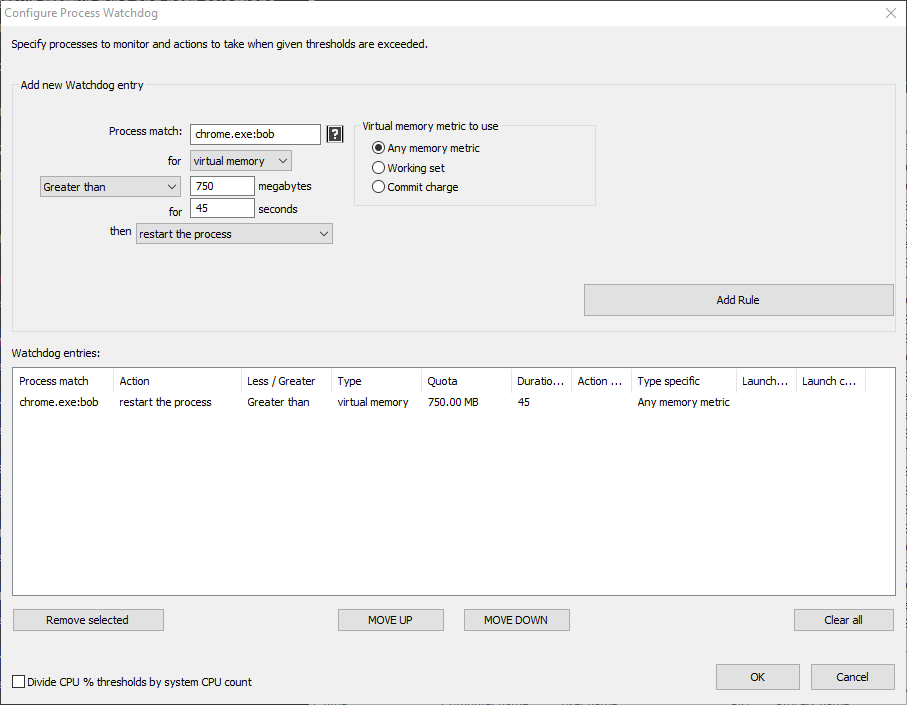
Memory priority doesn’t guarantee any limit on RAM use, and there is no good way to get one. You can create a Watchdog rule that trims a process’s working set when it goes over a certain size, but if the process is actively using that memory, it is paged right back in, and if it isn’t, Windows would page it out over time anyway.
Microsoft’s documentation describes it this way:
The memory priority of a thread or process serves as a hint to the memory manager when it trims pages from the working set. Other factors being equal, pages with lower memory priority are trimmed before pages with higher memory priority. For more information, see Working Set.
SmartTrim doesn’t reduce the total virtual memory processes use. It only flushes their memory out of RAM for a while. There is no good fix for running out of memory other than adding RAM or changing your workload.
Using the page file even while RAM is available isn’t necessarily bad, and generally shouldn’t be interfered with. Check how many hard page faults (reads back from the page file) actually happen, with the Windows Resource Monitor. If the number isn’t excessive, Windows’ use of the page file is nothing to worry about. Either way, Process Lasso can’t help with this.
It is the amount of free RAM that holds the system cache. Task Manager shows it too.
Windows can discard that cache and use the RAM as soon as an app needs it, so it doesn’t reduce your available RAM. It is just Windows making use of RAM that would otherwise sit empty, mostly by keeping recently and frequently used files in it. You want your RAM fully used, since it is the fastest storage in your PC.
SmartTrim can periodically clear the cache, but that generally isn’t advisable.
Easy Anti-Cheat blocks direct access to game processes, but Process Lasso can still set their affinities and priorities.
For CPU affinities, use inheritance. Instead of creating a rule for the game’s process, set a CPU affinity rule on the game launcher, such as Steam.exe; the games it starts inherit that affinity. Games that aren’t protected by an anti-cheat system can still have rules of their own if you want them to run differently.
For priorities, use Enforce by Windows Registry. It uses a built-in Windows method to set the priority when the process is created, so it works on processes Process Lasso can’t access, such as those protected by anti-cheat systems.
Some users also try System Reserved CPU Sets, a special form of CPU Sets that applies to the whole system. That is a heavy-handed measure, though, and less precise than rules for individual processes.
See anti-cheat in the documentation for more.
No. There has never been a single case of it, and for good reason: Process Lasso can’t be used for cheating in any way. It only makes outside adjustments to processes to improve performance, and it never touches process memory. At worst, if your rules don’t suit a game, the game will refuse to start.
No, they don’t conflict, and you can use them together. However, some users with certain CPU affinity rules on AMD X3D processors may get better results by turning off the Game Bar, so that Process Lasso’s rules alone control scheduling.
Microsoft Flight Simulator can be sensitive to CPU affinity changes, so remove any CPU affinity rule you set for it. You can reset all rules with Options / Reset Configuration. Process Lasso has no other incompatibility with MSFS.
If it keeps crashing after the rules are gone, uninstall Process Lasso for a while to see whether the crash is related to it at all.
Security (anti-malware) software protects its processes from changes so that malware can’t tamper with them. That limits what Process Lasso can see of them.
Adjusting real-time scanning components can also hurt performance, since they hold up other applications until their scans are complete.
Yes. It can see and manage only the Windows processes running inside Parallels.
We suggest setting the offending process’s CPU priority to Idle. CPU priority is technically the process’s priority class, so it applies beyond the CPU and may carry over to GPU scheduling.
The warning appears when the Process Lasso window starts for a limited (standard) user, who can’t change the configuration file without elevation. The message reads:
WARNING: The Process Lasso configuration is not writable. Use ‘Main / Elevate now’ or change the config path via ‘Options / General / Configure Startup’. Would you like to elevate Process Lasso now?
What to do depends on what your users need:
Process Lasso works with limited user accounts; only changing its configuration needs one of the steps above. When a limited user starts Process Lasso by hand (rather than at login), Windows shows a UAC elevation prompt, which can be dismissed but not suppressed.
The warning comes from the Process Lasso window (ProcessLasso.exe), which doesn’t need to run for every user. It hosts the tray icon and main window; the core engine (ProcessGovernor.exe) enforces all rules in the background on its own. On servers, the best fix is to start the window at login only for your administrators, or for no one, and open it by hand when you need it.
In Options / General / Configure Startup…, under Management Console (GUI) Startup, choose Do not start at login or the option to start only for your administrative user. See the Server Edition Quick Start for more.
Three features help:
For a web server such as Apache, experiment with a constrained CPU affinity on its process, for example taking away a couple of cores. If that keeps the server responsive under heavy load, switch to the CPU Limiter (Options / CPU / CPU Limiter…) so the affinity is constrained only when needed.
To try these, install the Process Lasso Server Edition trial.
First, make sure they are turned on: View / Graph Components / CPU Core Graphs.
Otherwise, your system’s performance counters may be corrupted. Run lodctr /R from an administrator command prompt, then restart Windows. For full instructions on repairing performance counters, see Manually rebuild performance counters.
Process Lasso, like many desktop apps, isn’t designed for high DPI, so Windows scales it up (without scaling it would look tiny). Making it high-DPI aware is a lot of work: Its graphs and other custom drawing would all need to be rewritten.
The default system scaling is normally fine for Process Lasso, so if its text is noticeably blurry, a setting is off. Try other scaling options, either for the whole system (Change the size of text, apps and other items) or just for Process Lasso: Right-click its shortcut, choose Properties, open the Compatibility tab, and click Change high DPI settings.
The Process Lasso window uses negligible resources while minimized. While visible, it uses a little CPU to keep the display up to date. To reduce that, lower its refresh rate in Options / General / Refresh Interval (GUI). For example, changing it from the default of 1 second to 2 seconds halves its CPU use. Checking View / Effects / Disable Progress Bar Themes may also help.
You can also close the window entirely. The core engine (ProcessGovernor.exe) keeps enforcing your rules in the background.
The refresh intervals for the window (GUI) and the core engine (Governor) are both in Options / General. Shorter intervals react faster to changes in the system but use more CPU. The default of 1 second is recommended.
There are two common measurements of CPU use: CPU Time % and CPU Utility %. CPU Utility % takes frequency scaling into account and can go over 100%.
Task Manager’s Processes tab shows CPU Utility, while Process Lasso’s process lists show CPU Time, as Task Manager’s Details tab does. Elsewhere Process Lasso shows CPU Utility, like Task Manager, and its status bar shows both.
CPU Utility over 100% is a valid measurement. The value comes from Windows’ performance counters; Process Lasso doesn’t compute it. CPU Time % can never go over 100%. Process Lasso caps CPU Utility at 100% in some places, such as the graph (Task Manager caps it too), while the status bar and tooltips show the actual value. To show CPU Time in the graph instead, uncheck View / Show CPU Utility % instead of CPU Time %.
For more, see CPU Utility % vs CPU Time % and Task Manager’s CPU numbers are all but meaningless.
Process Lasso shows GPU use in its main graph, a dedicated widget, the status bar and the process lists.
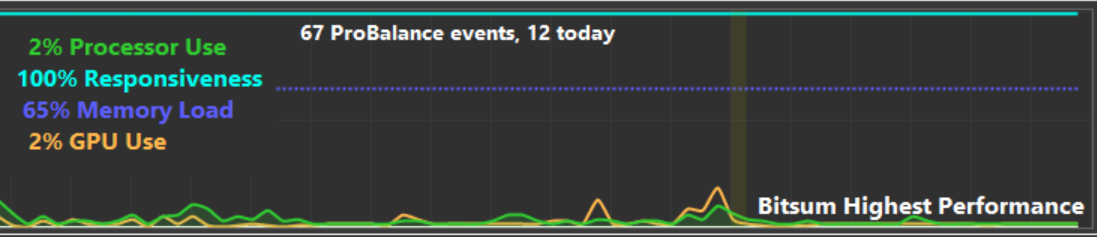
Reading GPU performance data always has some cost, often showing up as CPU use in ntoskrnl.exe, so Process Lasso collects it only while its window is visible. That is why the graph can have gaps in its GPU data. You can also turn GPU reporting off entirely in View / Graph Components.
No, Process Lasso can’t act on the System process directly. It is a special process for critical system work, mostly memory management.
The System process consistently using a lot of CPU isn’t normal; the load you see there is a symptom of a problem, not the problem itself. Check your RAM load and how much paging is going on, and consider resetting Windows to rule out persistent malware.
Bitsum Technologies
Independent Windows software since 2002. We build novel solutions to software performance and automation challenges.