Betanews on ProBalance:
Process Lasso’s headline technology is ProBalance, a smart tool which monitors running processes and intelligently adjusts the priority of resource hogs as they appear. Can this really make a difference? We used the developer’s “CPUEater” demo to create a process with 48 active threads, and tried launching Chrome (with its core files cached). It took 30-40 seconds to appear with ProBalance disabled, under 1 second with it turned on. That was a very extreme example, so we tried again with 16 threads (one per core), and Chrome loaded in 5 seconds; 8 threads and it loaded in around 2, still more than twice the ProBalance-enabled time. We tried a few other CPU-stressing apps with similar results. If you’re running multiple applications at the same time, and something tries to hog your CPU, then Process Lasso’s priority tweaks generally mean your system stays very responsive. – Betanews
Pro Tip: Don’t set your important processes to ‘High’ or ‘Real-Time’. This can cause complications and is usually ineffective at improving application responsiveness. ProBalance works from the other direction (lowering priority classes) for a reason.
Process Priority Classes
-
- Real-time
- High
- Above Normal
- Normal
- Below Normal
- Idle
There are several process priority classes (base priorities) available in Windows. These base priority classes, combined with individual thread priorities, result in effective thread priorities.
To maintain system responsiveness, ProBalance dynamically lowers the priority class of problematic background processes.
Introduction to ProBalance
Process Lasso’s ProBalance algorithm will improve system responsiveness during high CPU loads.
You don’t need to take our word for it, you can try ProBalance yourself with our synthetic test called CPUEater. Alternatively, virtually anything that puts a full load on your CPU will be a good demonstration of ProBalance.
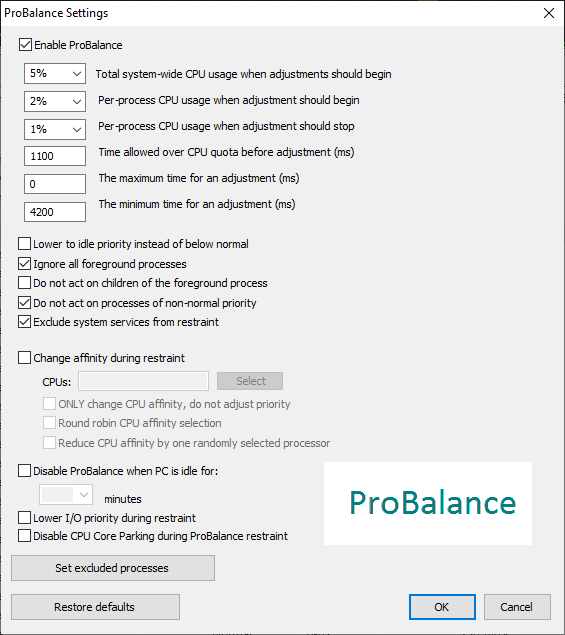
ProBalance is designed to act safely and conservatively. It makes only marginal, temporary changes during its activities and has no deleterious effects. It is able to do this because it takes only a small fraction of CPU cycles to restore basic responsiveness, thus taking these from the overall pool has a negligible impact on performance, but a huge impact on responsiveness. ProBalance also has a number of exclusionary parameters, such as avoiding the foreground process (meaning you will need to click away from a problematic application to have it engage, by default settings). These are configurable.
What’s the problem?
Windows has a particularly bad problem dealing with threads that decide they want to consume every bit of CPU time they can get their hands on (CPU bound threads). A single CPU bound thread running at Normal priority can bring an entire single-CPU system to a stall, as demonstrated by our graphical proof of concept below. Yes, it is true – believe it or not! It is this worst case scenario that Process Lasso was originally written to address. By temporarily lowering the priority of the offending process, your PC can be saved from a full stall.
Additional testing and refinement revealed that our algorithm not only protected against this worst-case scenario, but also was immensely useful at balancing average CPU loads. The small and conservative adjustments ProBalance makes are truly efficacious at helping to retain PC responsiveness and CPU fairness to all processes.
To improve fairness, the CPU scheduler of some operating systems, such as Linux, penalize CPU bound processes while rewarding I/O bound processes. This concept is similar to what ProBalance effectively does. Most threads are I/O bound. They give up their time slices pre-maturely as they enter a wait state for some type of I/O. However, CPU bound (CPU hungry) threads also exist from time to time, and do a real number of the less greedy I/O bound threads. These ‘greedy threads’ are at the heart of the scheduling problem mitigated by Process Lasso’s ProBalance.
What is ProBalance optimization?
ProBalance (Process Balance) is the name of our proprietary algorithm that dynamically adjusts the priority of running processes in an effort to keep your system responsive during high loads.
When there is a high load on the system CPU(s), the responsiveness of the PC can be severely impacted. On a single processor PC, it takes only one CPU hungry thread running at normal priority to bring the entire system to stall. Even high priority threads get totally starved of CPU cycles by a CPU hungry thread running at normal priority. This problem is inherent to the design of the Windows CPU scheduler and general OS architecture. Sure, it seems like such a problem should NOT exist — but it does, and its easily demonstrated (see ‘skeptics’ section below).
The casual user will often find their PC’s responsiveness diminished for brief periods (a micro lag). Sometimes this is due to an error occurring in a background process, and other times it is simply because there is such a high load on the CPU. You probably have experienced this before – mouse movement gets jerky and every action is terribly slow.
Process Lasso’s ProBalance intelligently lowers the priority class of background processes when they may be interfering with system responsiveness. This doesn’t hurt the performance of background processes since they still get a considerable amount of the available CPU time, but it helps the responsiveness of foreground processes tremendously. After all, usually it just takes a few CPU cycles to keep the foreground process responsive. Taking these from background processes, when necessary, is hardly detrimental to them. Also, the adjustment is temporary, so its undone as soon as system conditions change. Process Lasso is designed to be minimally obtrusive, lowering priorities only when appropriate, and making sure that the background processes still perform just fine.
Phrased another way: So how does ProBalance make a difference? Well, it turns out that by marginally, dynamically, and temporarily decreasing the priority class of problematic background processes, that 1% or less of CPU cycles necessary to let you have fluid mouse and keyboard movement, or in worst case scenarios, control of your PC at all, is available.
Proof of Concept – Does Process Lasso’s ProBalance really work?
With all the various scams out there, such as ‘RAM defragmentation’ (ugh!), it is natural to be skeptical. The most common argument comes from those who have overconfidence in the performance of the Windows CPU scheduler. These people believe that if the Windows scheduler is written as it should be, then surely normal priority threads can’t substantially interfere with the performance of other normal (and above) priority threads. This argument is echoed particularly in non-Windows crowds who haven’t experienced the real-world performance of the Windows CPU scheduler.
Most Windows developers will tell you they are disappointed with the Windows CPU scheduler. They will tell you of a time when they had a bug that caused an infinite loop in a normal priority thread running in a process of normal priority class. Much to their dismay, their system was brought to a stall. They’ve seen this happen. They’ve stood in disbelief.
The truth is that, on a single CPU system, a single thread of normal priority can bring the entire PC to a near freeze! Even high priority threads can get starved of CPU time by a CPU hungry thread of normal priority. Yes, amazing but true. For multi-CPU systems, the number of threads required to bring the system to a complete stall is equal to the number of CPU’s available. Don’t believe us? Try our demonstration app, or write your own. Any thread that does nothing but eat up CPU cycles without restraint will demonstrate this phenomenon.
Demonstration
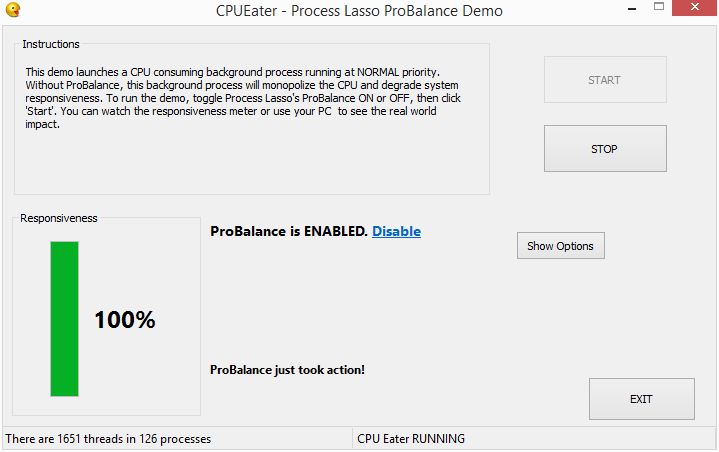
We have developed a ‘CPU eater’ that you can test Process Lasso with. This CPU Eater creates a handful of CPU consuming threads running at NORMAL priority (normal priority in a normal priority class). Now, if the Windows CPU scheduler behaved like we would expect, the PC would handle this small load of normal priority threads just fine. That’s not what occurs though. Instead, the Windows CPU Scheduler allows for complete monopolization of the CPU! Now, see for yourself… Note that the CPUEater GUI itself runs at a higher priority class just to be able to control the ‘CPU Eating’ process/threads it spawns, which are running at NORMAL priority.
Download 64-bit CPUEater … or 32-bit
How to use the CPU Eater to demonstrate Process Lasso’s ProBalance efficacy:
-
- Download and run the CPU Eater (32-bit or 64-bit)
- Press the ‘START’ button to start the CPU Eater
- Your PC should grind to a near halt! Don’t worry, it will stop ‘eating’ in a few seconds
- Download and install Process Lasso
- Press the ‘START’ button to start the CPU Eater once again
- With Process Lasso’s ProBalance, responsiveness is retained during even this high CPU load!
Keep in mind that the threads of the background process the CPU Eater launches are all running at NORMAL priority, and they aren’t doing anything besides run in pointless infinite loops. No adjustments are made, we just let Windows handle it. Any application running on your computer has the potential to cause the same effect as our CPU Eater did.
This is no trick! You can create your own CPU Eater with a simple while(1) loop at NORMAL priority. If you run at a higher or lower priority class, you will need to change the ProBalance option ‘Ignore processes of non-normal priority’. This is done by default to exclude processes that have set their own specific priority class, under the assumption that they did such for a good reason.
How our test works
A demonstration of the deficiencies in the Windows scheduler is easy. First, for the sake of simplicity, we’ll start describing a system that has a single CPU. The demonstration is easily scaled to multiple cores, but it is easier to describe the concept for a single CPU system.
First, create a process that does nothing but run in an infinite loop, thereby consuming all CPU cycles available to it. We’ll call this a ‘CPU eater’. Now, launch this process as any other application, at a normal priority class. If the Windows CPU scheduler works as one would expect it to, the performance of other processes on the system, and the foreground process, shouldn’t be severely impacted. Unfortunately, you’ll find that this single process, running at normal priority, actually so starves other processes of CPU cycles that the system grinds to a near halt — even termination of the offending process is very difficult. This is true even with the Vista CPU scheduler, despite its improvements.
To scale this argument up to multiple CPU’s, simply allow the ‘CPU eater’ process to have multiple threads, or launch more instances of the CPU eater process. The same effect will be seen.
ThreadRacer is an alternate tool to initiate a compute load that allows more precise control of which cores are loaded. See this page for information on it.
FAQ
Does ProBalance slow down processes? Why is it called a restraint?
No! The ProBalance feature doesn’t actually ‘restrain’ anything. We used that term only for lack of a better one. ProBalance’s default action is to simply temporarily lower the offending process’s priority class to Below Normal, a marginal change to the precedence during contention. In real-world and synthetic tests, as shown in the CPUEater demo, this is all it takes to restore responsiveness to the rest of the PC, and it certainly doesn’t impact the performance of targeted applications.
Why no fix from Microsoft?
At worst, this problem would be considered an edge case at Microsoft, and not worth the risk inherent in making a major change to their CPU scheduler. Such a change could affect legacy software. Further, they anticipate applications to mostly control themselves, and not monopolize the CPU.
Further, in a high CPU load situation with equal thread priorities, it is impossible for Microsoft to know for sure which thread really needs the CPU most.
With a little ‘market intelligence’, some logic, and help from the user, Process Lasso’s ProBalance can do better by making intelligent, dynamic, temporary , and marginal adjustments to the process priority class of offending applications — saving your PC from a total stall or simply increasing responsiveness.
Is ProBalance effective for multi-core PCs?
Yes, unquestionably! ProBalance has efficacy even on the latest generation of processors, and this is expected to continue to be true for the foreseeable future.
At Bitsum we’ve also well demonstrated that even on a multi-core system, if a single core is fully consumed by a CPU bound thread, the PC as a whole can suffer odd and unpredictable effects on overall responsiveness. Lags, stalls, and freezes all start to occur as soon as a single core is fully saturated.
Should I re-prioritize all my processes, ranking them in importance to me?
Absolutely NOT. Some programs out there encourage you to do just that, but it is dangerous. The authors of these programs are either not aware of the dangers, or don’t care. While Process Lasso supports setting persistent priorities, it is only meant to be used under certain appropriate circumstances. If you aren’t an expert, it is best to let Process Lasso’s carefully designed ProBalance algorithm dynamically adjust process priorities as necessary.
What about Foreground Boosting (NOT what ProBalance does)?
Foreground boosting is a common scheme used by some snake-oil software. Do not be fooled! We are including it here because we want people to know ProBalance is NOT such an algorithm, and why such algorithms are not usually beneficial. That said, Process Lasso does have a robust Foreground Boosting feature if you want it, as it can be helpful in certain situations, but is not enabled by default.
The foreground process is that which has the keyboard and mouse focus. This means there is only ever one foreground process at a time, per user session. Windows already applies foreground boosting by giving the foreground thread longer time slices. Further increasing the priority of the foreground process and/or the specific foreground thread is not only ineffective, but harmful. Remember, giving a process a higher priority does not mean it will run faster. It simply means if several processes are active at once, it will have a higher precedence. However, if any single process has too high a precedence over other processes, as foreground boosting would result in, complications can occur. This is partly because of the additional (and now very high) CPU priority ‘skew’ between the process and its dependencies.
Be very wary of any utility that claims to boost PC performance by increasing the priority of the foreground process. In some cases, the author of the program simply doesn’t understand the CPU scheduler and why this is a bad idea. In other cases, companies don’t care and are just trying to make a profit. In short, it is a very wrong solution and should be avoided at all costs.
Quotes
People who said it better than us:
I should also note that Windows has other scheduling complications, such as “foreground” and “background” tasks […] However, the bottom line, in my humble opinion, is that the operating system is more concerned in ensuring that a task that is not ready to run does not, than making sure all tasks get a fair shake. […] We can, however, detect thread and process CPU utilization, and help the operating system to adjust the prioritization.
- Everything you never wanted to know about OS multi-tasking (and why out of control processes need priority adjustment) – TMergent Technologies
One process that takes up 100% of the CPU time may slow the other applications to snail speed for example, despite the fact that modern OSes use preemptive multitasking.
- Hardware Virtualization: the Nuts and Bolt– Johan De Gelas, AnandTech
Priorities and their purpose are often poorly understood. Usually the misapprehension exists that if a process is taking a long time to complete then, if anything, its priority should be increased with the intent to make it finish faster. In most cases the CPU is spending near to all of its time executing the process anyway, so increasing the priority is only going to tell the scheduler to do what it is already doing. It may seem paradox but it is in fact more sensible to reduce the priority of the busy process so that the system is prepared to let other processes have some time thus allowing them to remain functional. In most cases other processes will not be using a significant amount of the CPU’s time and allowing them to execute when they want to will not slow the busy process by any notable amount. Computer applications simply have to be idle practically all of the time in order for them to react quickly when the user interacts with them. Therefore, allowing a well behaved application to continue to respond in such a way will not take a significant amount of time away from the busy process.
Peter Ball
To prevent tasks from hogging the CPU and thus starving other tasks that need CPU access, the Linux 2.6 scheduler can dynamically alter a task’s priority. It does so by penalizing tasks that are bound to a CPU and rewarding tasks that are I/O bound. I/O-bound tasks commonly use the CPU to set up an I/O and then sleep awaiting the completion of the I/O. This type of behavior gives other tasks access to the CPU.”
ProBalance in Process Lasso
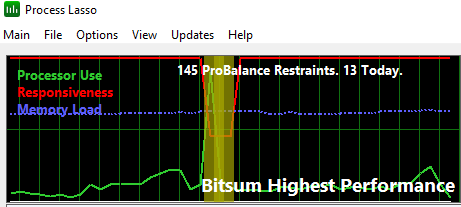
ProBalance ‘just works’ as soon as the user installs Process Lasso. It is smart, so doesn’t require much tuning. At worst, the user may need to exclude one or more processes from ProBalance, but only if ProBalance actions are taken inappropriately on a process. This can be confirmed via the log or Insights module. Remember, if there is nothing in the log, then ProBalance didn’t touch that process.
ProBalance ‘just works’ as soon as you install Process Lasso.
Process Lasso’s system tray icon changes to a red one while a ProBalance action is taking place.