
Current Version: 0.0.2.8 ALPHA
As an early alpha, parsing errors may exist! Be sure to check the DIFF carefully before and after import. Reload the .REG file to ensure it seemed to be imported correctly.
Although RegMerge does attempt to create a REG undo file, we recommend manually creating a Restore Point prior to any registry operation with this tool in its alpha state.
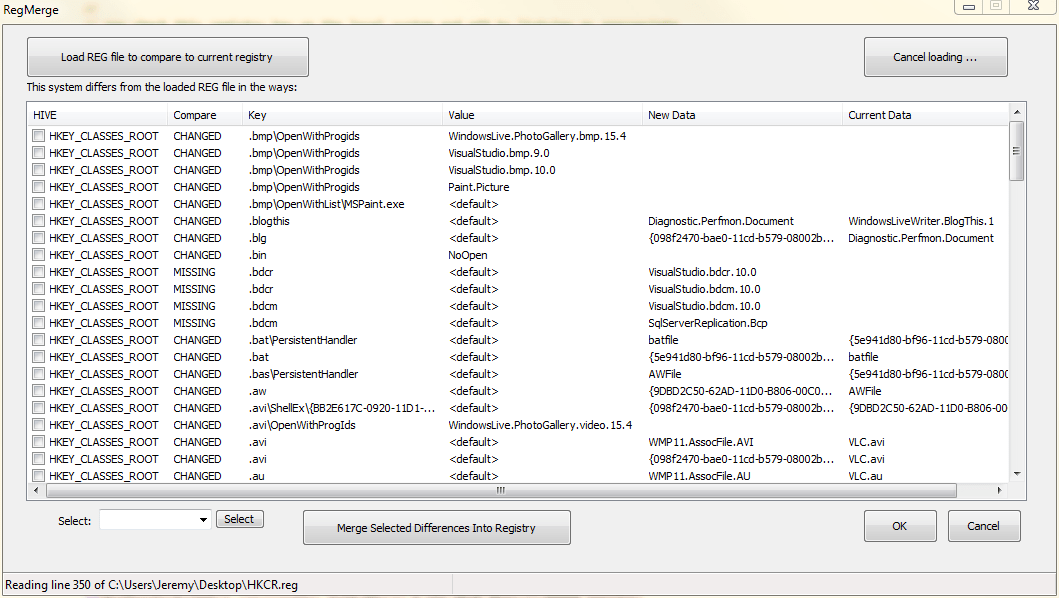
RegMerge is the SAFER way to import .REG files! With RegMerge you load up one or more .REG files and compare them to your current registry, allowing you to selectively import parts, or just see the changes. This is useful for REG file fixes you find on the internet, or comparing your registry with another PC or your own PC in an earlier state.
The ‘registry’ sure sounds like a dirty and cluttered thing these days, a myth partially perpetrated by marketing. In fact, it is simply a store of persistent data, usually used for settings. While there may sometimes be leftover registry debris, it is entirely benign. Common Windows registries hold millions of registry values, meaning that even thousands of keys of debris don’t make the slightest difference. High efficiency data trees and algorithms are used to look up registry data.
A Registry Hive is simply a broad store of registry data. It’s backing storage is on the file system. For instance, one hive holds registry values for all users of the machine (HKEY_LOCAL_MACHINE), while another holds one for the current user (HKEY_CURRENT_USER).
Once you determine you’ve got a messed up shell file association, or other potential registry problem, you may search the web. You’ll often find files with the extension .REG. These are RegEdit import/export files. With the Windows RegEdit utility you can right-click on any key and export a .REG file. Then, you can take this .REG file and import it to another system by double clicking it. This lets people provide you with .REG files to repair your registry. However, when you double-click one, you get the simple option of importing it – nothing more. It overwrites any content already there. So, you had better check to see what you are importing and compare it to what is currently there. In this way, you can make sure the REG file is actually solving the problem and not causing additional harm.
Obviously, What is needed is a utility to take a REG file, compare it to your current registry hives, and show you the changes it would make — then allow you to selectively apply those changes. That is what our freeware utility RegMerge does. It shows you the changes between the REG file you are importing and your current registry HIVE(s). It can also let you COMPARE and CONTRAST the differences between a fresh install of an OS and your install.
Safety features:
Again, to CREATE .REG files for backups or comparison, use Window’s RegEdit utility (RegEdit.exe). Simply select a key, right-click it and select ‘Export’. This will create a .REG file.
There are numerous planned enhancements to this utility that will occur incrementally. At this time, it is best not to submit any feature suggestions. We have a long list that probably already includes everything you’ve considered. There are some obvious improvements that need to be made. Again, this is an early alpha prototype.
Here is where YOU come in. We can not possibly collect repair sets for all Windows OSes and applications in the world. In fact, the more specific a repair set, the more likely it is the be useful. We are therefore going to leave it up to the community to help contribute repair sets.
We hope the community will help build an extensive REG repair set collection, so that users can use it for select repairs, return to defaults, and other operations. More on this soon. Remember, this is FREEWARE and will be an OPEN, COMMUNITY project.
We all know that the #1 issue that mandates OS re-installs is registry corruption. I didn’t say registry ‘fat’, I said corruption. Often, registry cleaners themselves are the cause of this corruption. Regardless, over the normal lifespan of a Windos install, the registry gets changed and manipulated. Wouldn’t it be nice to know what all has changed? Maybe go back to defaults? Apply fixes selectively and safely?
Registry issues come from:
Call this the opposite of a registry clean. The idea here is NOT TO REMOVE keys, it is to ADD and REPLACE keys and values. That’s right – make your registry right again, not just pointlessly trim it down.