

Get it from CNET Download.com!
Or get the x64 Edition

PURCHASE NOW
Buy one, give one free!
Why Pro?


Don't know if you need the 32-bit or 64-bit build? Download the 32-bit build. It will let you know if you need the 64-bit build, and even download it for you.


Available in 11 languages: English, German, Japanese, Serbian, Portuguese/Brazilian, Russian, Italian, Finnish, Simplified Chinese, Traditional Chinese, Indonesian, and Dutch!


WARNING: Beware of pirated copies! Don't take the risk. Know what you are getting.


NO gimmick!

Skeptical?

Try our graphical demo!


What is ProBalance? Also known as 'Process Balance', it is a way to dynamically adjust the priority of running processes so that badly behaved programs do not degrade system responsiveness. More info...
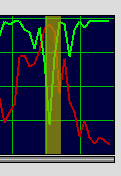

Example: Process Lasso's ProBalance improves system responsiveness (green) during a high load via process priority optimization.


What is the differences between the Free and Pro builds?

Process Lasso The ultimate automated process priority and multi-core optimization tool!


Buy one, GIVE one free!

PORTABLE EDITION USAGE:

  1. Extract archive to your removable media
  2. Open Process Lasso folder on removable media when ready to launch
  3. Double click "_Start-ProcessLasso.bat"
Lasso Portable 32-bitLasso Portable 64-bit

Process Lasso is a unique new technology that will improve your PC's responsiveness and stability during periods of high CPU load. Windows, by design, allows programs to monopolize your CPU without restraint -- leading to freezes, hangs, and micro-lags. Process Lasso's ProBalance (Process Balance) technology intelligently adjusts the priorities of running programs so that badly behaved processes won't negatively impact the responsiveness of your PC.

Process Lasso also offers an assortment of ways to take full control of how your CPUs are allocated to running programs. In essence, it is an all-in-one automated Windows process tuner. You can choose at what priority processes should run, and which CPUs should be assigned to them. You can also disallow certain programs from running, log all programs run, automatically restart programs, limit the number of instances of a program, and much more. You can even indicate processes that should induce entrance into the High Performance power scheme or prevent the PC from sleeping. A gaming mode also allows for easy process priority optimization for avid gamers.

  • Process Priority and Affinity Optimization
    Automatically balance process priorities (and/or CPU affinities) in a safe, effective manner to improve PC responsiveness during high loads and prevent system stalls and micro-lags. Our years of experience have resulted in a highly optimal algorithm duplicated nowhere else. We call it ProBalance. For more information and a graphical demonstration to run on your own PC, see this page.
  • Default (sticky) priorities and affinities
    Set sticky CPU or I/O priorities and CPU affinities for your processes, allowing you to tweak the way in which they are executed
  • Multi-Core Optimization
    Through sticky CPU affinities and ProBalance affinity adjustments, you can optimize your multi-core processor to make the most efficient use of your CPUs (cores). It also offers logical core avoidance to improve performance of certain applications on HyperThreaded CPUs.
  • Process Watchdog
    Terminate, restart, or change CPU affinity when a specified threshold is met
  • I/O Priorities
    For Vista and above you can set the current or sticky I/O priority of processes
  • Power Profile Automation
    Automatically switch the power profile to whatever you want when the application(s) you indicate run
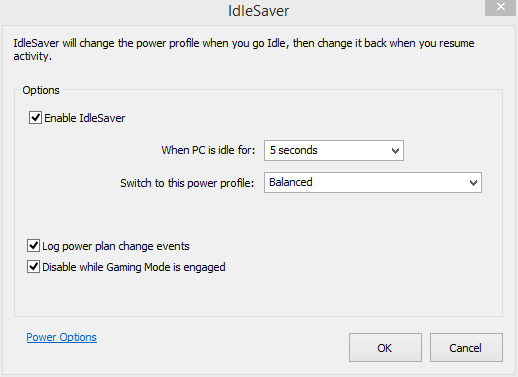
  • Energy Saver New in beta
    This new feature allows you to remain in High Performance (or any power profile) until your PC goes idle for X seconds. It then switches to another profile, such as Power Saver or Balanced (your choice of any). This allows you to conserve electricity without compromising performance.
  • Auto-terminate
    Terminate select processes any time they are found to be running
  • Instance Count Limits
    Limit processes to a specified number of instances
  • Independent Core Engine
    This core engine (the governor) actually does the work. It can operate in the background as either a normal process *or* as a service, running as a system service or a service in a specific user context. By having only it start, there is no user interface or system tray icon. The GUI can be launched on-demand as needed for ocnfiguration changes.
  • System Responsiveness Metric
    Our unique algorithm monitors system responsiveness with amazing accuracy
  • Minimal Resource Use
    NOBODY uses less resources for this type of task than Process Lasso. It is written in native C++ and continually refined for maximum efficiency. A native 64-bit build also available. Private memory usage by the core engine is typically under 1MB! (depends on system)
  • Utilizes new features of Windows Vista/7
    Makes use of latest features of Windows 7, but maintains full backwards compatibility to Windows 2000!
  • Hyper-Threaded Core Avoidance
    Avoid these 'fake' cores for maximum performance of some applications.
  • Select Multiple Processes at Once
    Want to terminate 5 different processes at once? Or set their current or sticky priority class or CPU affinity? No problem. Select multiple processes and work with them.
  • So much more...
    Discover for yourself what Process Lasso can do for you! Quick example of one more feature -- the multi-select feature.. That's right, select multiple processes and act on all of them at once!

As an aside, in Windows Vista and Windows 7, adjustments of the process priority class also have an effect on the I/O and SuperFetch memory priorities for that process.

Once you install Process Lasso, it will just start working. More advanced users can tweak the configuration, but you needn't touch anything to have it instantly improve your system responsiveness and prevent stalls in high load situations.

Process Lasso is very useful and effective on even the latest high-end PCs. However, its ProBalance algorithm achieves maximum effect on PCs with relatively little CPU 'power', such as Netbooks, Tablets, and older desktops.

Process Lasso runs on all editions of Windows 2000, XP, 2003, 2008, Vista, and Windows 7.

NOTICE: This is a gimmick free web site! We only sell software that WORKS. We provide proof, but the best evidence is seeing for yourself. Use Process Lasso a while, try it out. Process Lasso consumes barely any system resources itself. It uses a stand-alone background core engine that needs as little as 1MB of RAM to run. We don't make a big splash, but do make a big difference!

Process Lasso is written in native C++, not .NET. The background core engine that manages processes is completely independent from the graphical user interface, allowing you to keep process rules applied with almost no overhead. With Process Lasso, load time is instant and resource consumption is minimal.

Graphical Interface Features

  • Basic task manager capabilities for convenience
  • Act on *multiple* processes at once
  • Show only active processes, or all processes
  • Displays per-process CPU history
  • Change process settings and rules
  • System tray icon with notifications
  • Extremely low resource use, and sleeps when minimized to tray


Easy to use menu system allows for setting of process defaults and other options.

More screenshots ...

Process Lasso's background process management engine is completely independent of the GUI. It can run all by itself, silently enforcing process rules and logging process events.


The system tray icon is actually part of the GUI. The process management engine is completely silent.


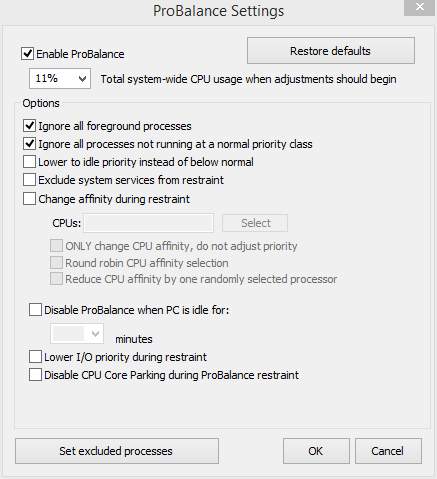
ProBalance Configuration Dialog


"Simply install Process Lasso and its ProBalance will do the rest."


What is the Portable Edition?

This edition is for people who prefer to run Process Lasso off of a USB key, for easy porting to other computers. It has *nothing* to do with laptops or netbooks. The standard edition of Process Lasso works great for them.

Downloads